
A budget is not a list of things you are not allowed to buy. It is a plan for where your money will go, written before the month starts, and a habit of checking afterwards whether it went there. Most people who give up on budgeting do so because the plan was unrealistic or the checking took too long, not because budgeting does not work.
This guide explains how to build a budget step by step, compares the most common budgeting methods, covers irregular costs and irregular income, and shows how to run a short monthly review. It uses the two free budget templates on ProTemplates: a monthly budget for Google Sheets and an annual budget for Excel. Neither is financial advice; they are tools for organising your own figures.
All budget templates
-
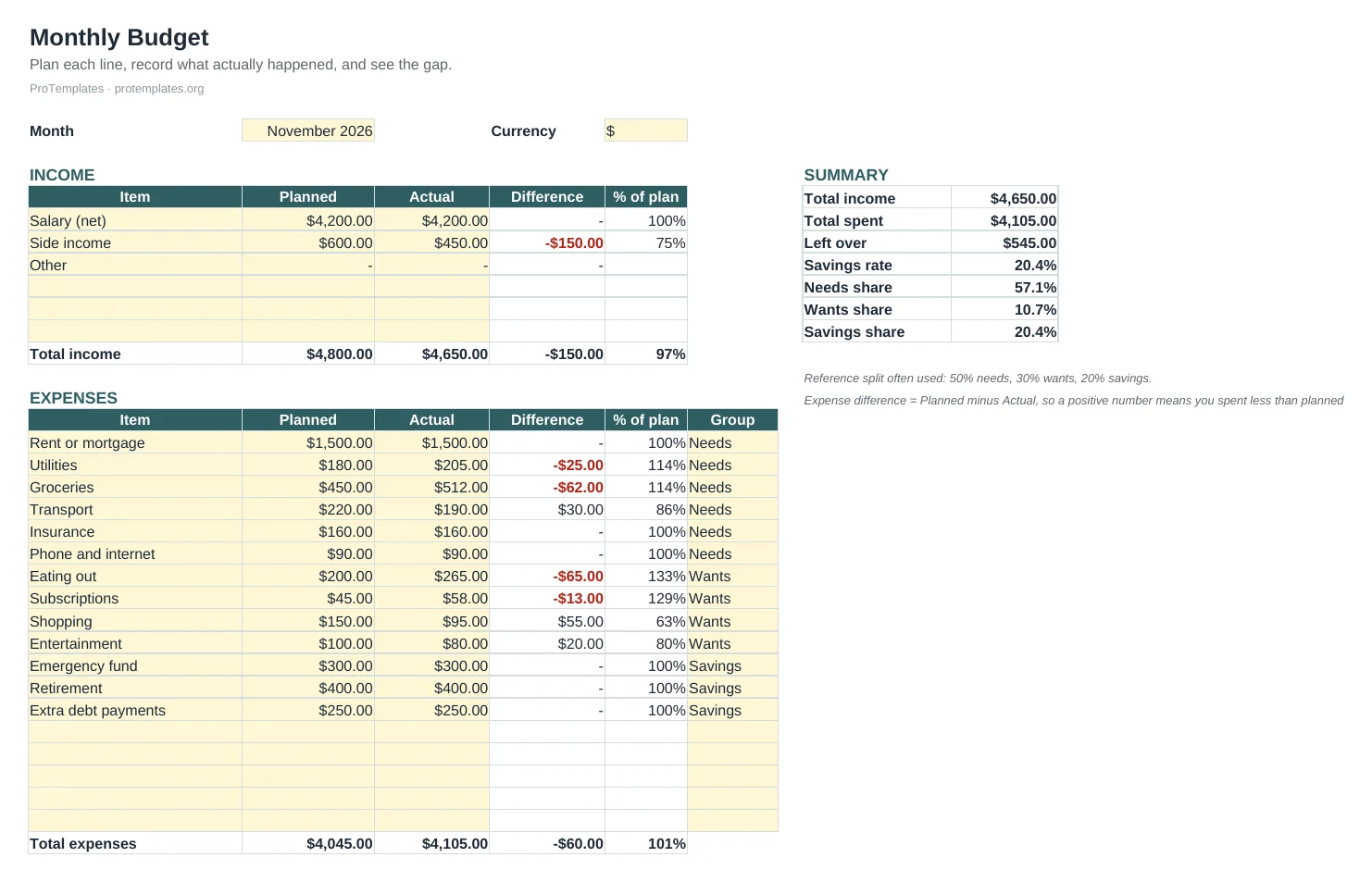
Free Budget Template for Google Sheets
This free budget template for Google Sheets lets you plan each month’s income and spending, record what actually happened and see the…
-
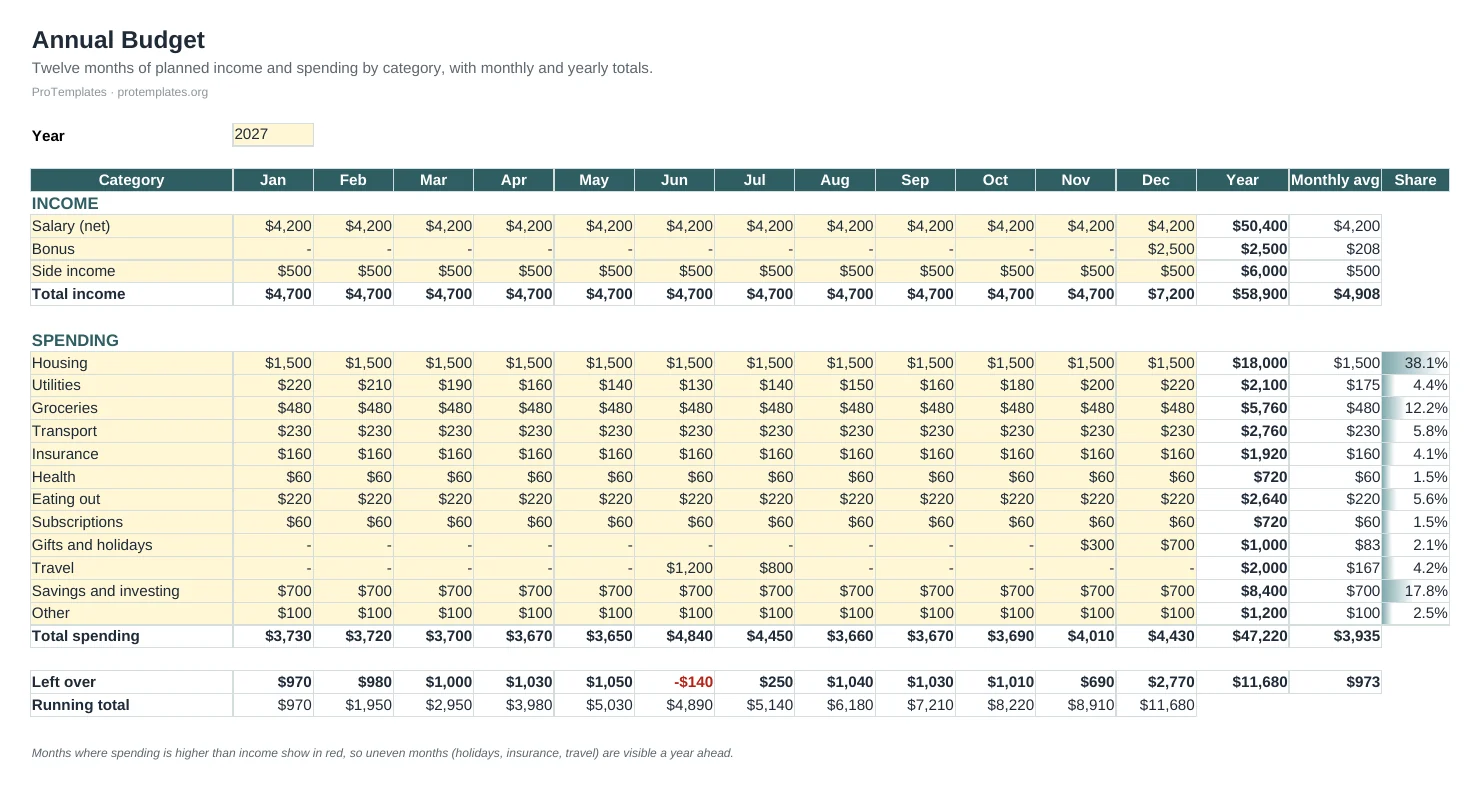
Annual Budget Template for Excel
This annual budget template for Excel lays out twelve months of planned income and spending by category on one sheet. Monthly and…
What a budget is for
A budget answers one question each month: did the money go where I planned? The comparison between planned and actual figures is where its value lies. Gaps show which costs have crept up, which habits need attention and how much is really left for savings or debt.
A budget also turns vague goals into numbers. “Save more” becomes “move 300 a month to savings on payday”. “Spend less on food” becomes “groceries 450, eating out 120”. Once a goal has a number and a line in the budget, you can see each month whether you are on track.
Four steps to a budget that works
The U.S. Consumer Financial Protection Bureau describes building a budget in four steps: identify all of your income, track your spending, note when your bills are due, and then pull everything together into a working budget. In practice:
- List your income. Use take-home pay after tax and deductions, plus any regular extra income. If your income varies, start with a cautious figure.
- Track your spending. Look back at one to three months of bank and card statements and group the spending into categories you recognise, such as housing, groceries, transport, bills, eating out and subscriptions. The expense tracker helps if you want to log purchases as they happen.
- Map your bills. Note when each regular bill leaves your account, so you know which part of the month is tight.
- Build the working budget. Set a planned amount for each category so that spending plus savings equals income, then compare actual figures at the end of the month.
The budget template for Google Sheets follows this structure: plan your income and spending, record what actually happened and see the gap line by line, with your savings rate and your real split against the 50/30/20 rule worked out for you. Our guide to making a budget in Google Sheets walks through it step by step.
Budgeting methods compared
There is no single right method. The best one is the one you will keep using. Three are especially common.
The 50/30/20 rule
Popularised by Elizabeth Warren and Amelia Warren Tyagi in their 2005 book All Your Worth, this rule splits take-home pay into roughly 50% for needs, 30% for wants and 20% for savings and extra debt payments. Its strength is simplicity: three buckets instead of dozens of categories. Its weakness is that the proportions may not fit everyone; where housing is expensive, needs alone can take more than half of income. Use it as a benchmark rather than a rule. The Google Sheets template shows your real split so you can compare.
Zero-based budgeting
Every unit of income is given a job until income minus planned spending and saving equals zero. Nothing is left unassigned, which makes leaks easier to spot. It takes more effort than 50/30/20 and suits people who want close control or are paying down debt.
Pay yourself first
Savings are moved out on payday, before any other spending, and the rest is spent with lighter tracking. It is the simplest method to keep up and works well when spending is already reasonable and the main goal is to save consistently.
You can combine methods. Many people pay themselves first, then use a simple category budget for the rest.
Monthly or annual budget?
- Monthly suits regular income and regular costs. You plan each month and compare plan with actual line by line. The Google Sheets budget is built for this.
- Annual suits households with large costs that arrive once or twice a year, such as insurance, school fees, holidays, car maintenance or tax bills. Seeing all twelve months side by side shows the expensive months in advance. The annual budget template for Excel lays out twelve months by category, with monthly and yearly totals, the average per month, each category’s share of spending and a running total that shows how the year builds up.
Many people use both: the annual budget once a year to see the big picture and plan irregular costs, and the monthly budget every month to stay on track.
Irregular costs and sinking funds
Irregular costs are the most common reason a budget breaks. The car service, the annual subscription, the birthday month, the boiler repair: none happens every month, so none appears in a budget built from one month of statements, and each one feels like a crisis when it arrives.
A sinking fund solves this. List the irregular costs you can foresee for the year, add them up, divide by twelve and set that amount aside every month, ideally in a separate savings account. When the bill arrives, the money is already there.
- Use last year’s statements to find the irregular costs you forgot.
- Add a general buffer line for costs nobody can foresee.
- Plan the sinking fund in the annual budget and include the monthly transfer as a line in the monthly budget.
Budgeting on an irregular income
Freelancers, commission earners and seasonal workers face a different problem: income itself changes from month to month. A few adjustments make budgeting workable:
- Budget on your lowest typical month, not your average. Treat anything above it as extra.
- Keep a buffer. Hold one or two months of essential costs in a separate account and pay yourself a steady amount from it.
- Separate business and personal money. Set aside tax on business income as soon as it arrives.
- Decide in advance what extra income is for, such as topping up the buffer first, then savings, then wants.
If you run a business, the cash flow forecast is the better tool for the business side, and the personal budget can then draw a steady amount from it.
Budgeting as a couple or household
A shared budget works when both people agree the categories, the targets and who checks what. A Google Sheet suits this well, because both can see and update the same file from any device.
- Agree shared goals first, such as an emergency fund, a holiday or paying off a card, then set the numbers.
- Decide which costs are shared and which are personal, and how shared costs are split.
- Give each person a personal spending amount that needs no explanation.
- Hold the monthly review together and keep it short and practical.
The monthly budget review
The review is the habit that makes a budget work. Twenty minutes once a month is usually enough. The day after payday suits many people, because the new month’s plan can be set at the same time.
- Fill in actual figures for the month that has just ended.
- Look at the three biggest gaps between planned and actual, and decide whether the plan or the spending should change.
- Check the savings rate and the progress towards each goal.
- Set next month’s plan, including any irregular costs due.
- Move savings and sinking fund transfers on payday.
The review fits naturally into a regular weekly review at the start of each month, or into a monthly finance routine if you also run a business.
Common mistakes and simple fixes
- Budgeting from gross pay. Use take-home pay, after tax and deductions.
- Too many categories. Twenty categories are hard to keep up. Start with ten or fewer and split them later if needed.
- No room for fun. A budget with no wants line is abandoned quickly. Plan some spending you never have to justify.
- Forgetting irregular costs. Use a sinking fund and an annual view.
- Giving up after one bad month. A month over budget is information, not failure. Adjust the plan and carry on.
Guides
- How to Make a Budget in Google Sheets
A working Google Sheets budget needs only two tabs and one formula: a transactions log and a summary that totals each category with SUMIFS. Here is how to build it and keep it running month after month.
Questions
Monthly or annual budget?
Monthly if your income and spending are regular and you want to compare plan with actual each month. Annual if you plan around yearly costs such as insurance, holidays or tax. Many people use both.
What is the 50/30/20 rule?
A rule of thumb that splits take-home pay into about 50% for needs, 30% for wants and 20% for savings or extra debt payments. It is a benchmark, not a requirement; the Google Sheets template shows your real split.
Do the templates work in Excel and Google Sheets?
Yes. Both are standard .xlsx files that open in Excel and Google Sheets with their formulas intact.
Can I use a budget template for a business?
For a small business, the cash flow forecast is usually more useful than a household budget, because it shows when money arrives and leaves.
Is this financial advice?
No. The templates and this guide help you organise your own figures. For debt, tax or investment decisions, speak to a qualified adviser.