
Being productive is not about doing more things. It is about doing the right things at a pace you can keep, and not carrying the rest around in your head. The tools that help are surprisingly simple: one list of everything you need to do, a short plan for the week, a record of what was agreed in meetings and a few minutes each week to check that it all still adds up.
This guide explains how those pieces fit together, the habits that make them stick and the free ProTemplates files that handle each one: a to-do list for Excel and Google Sheets, a weekly planner for Notion and a meeting notes template for Notion.
All productivity templates
-
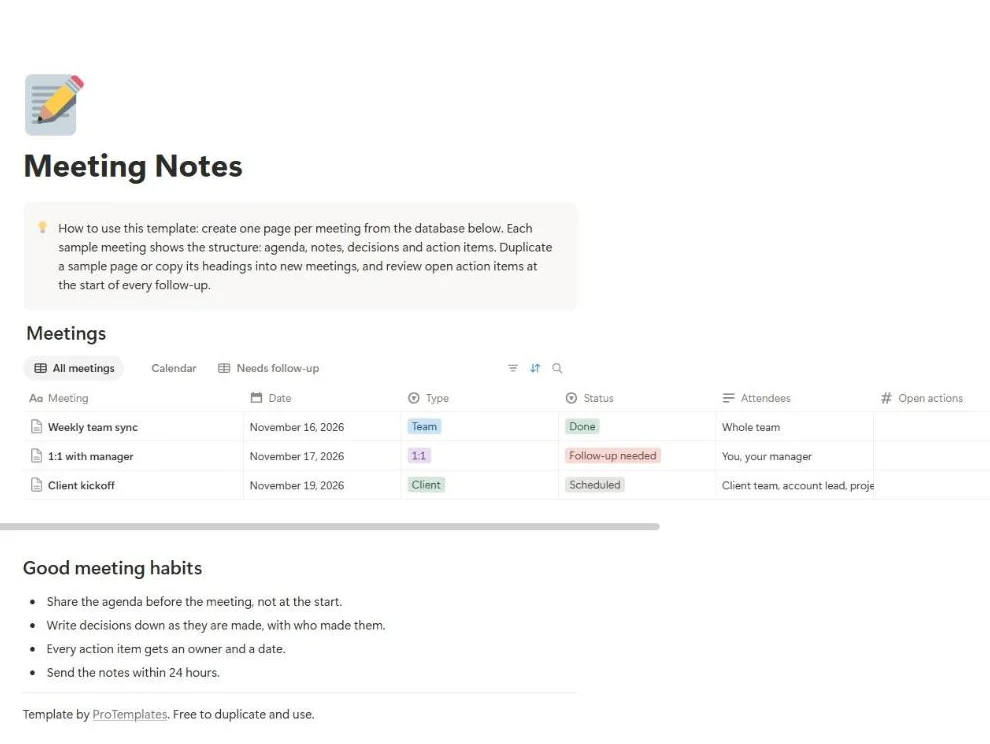
Meeting Notes Template for Notion
This free meeting notes template for Notion gives every meeting the same four parts: agenda, notes, decisions and action items. Each meeting…
-
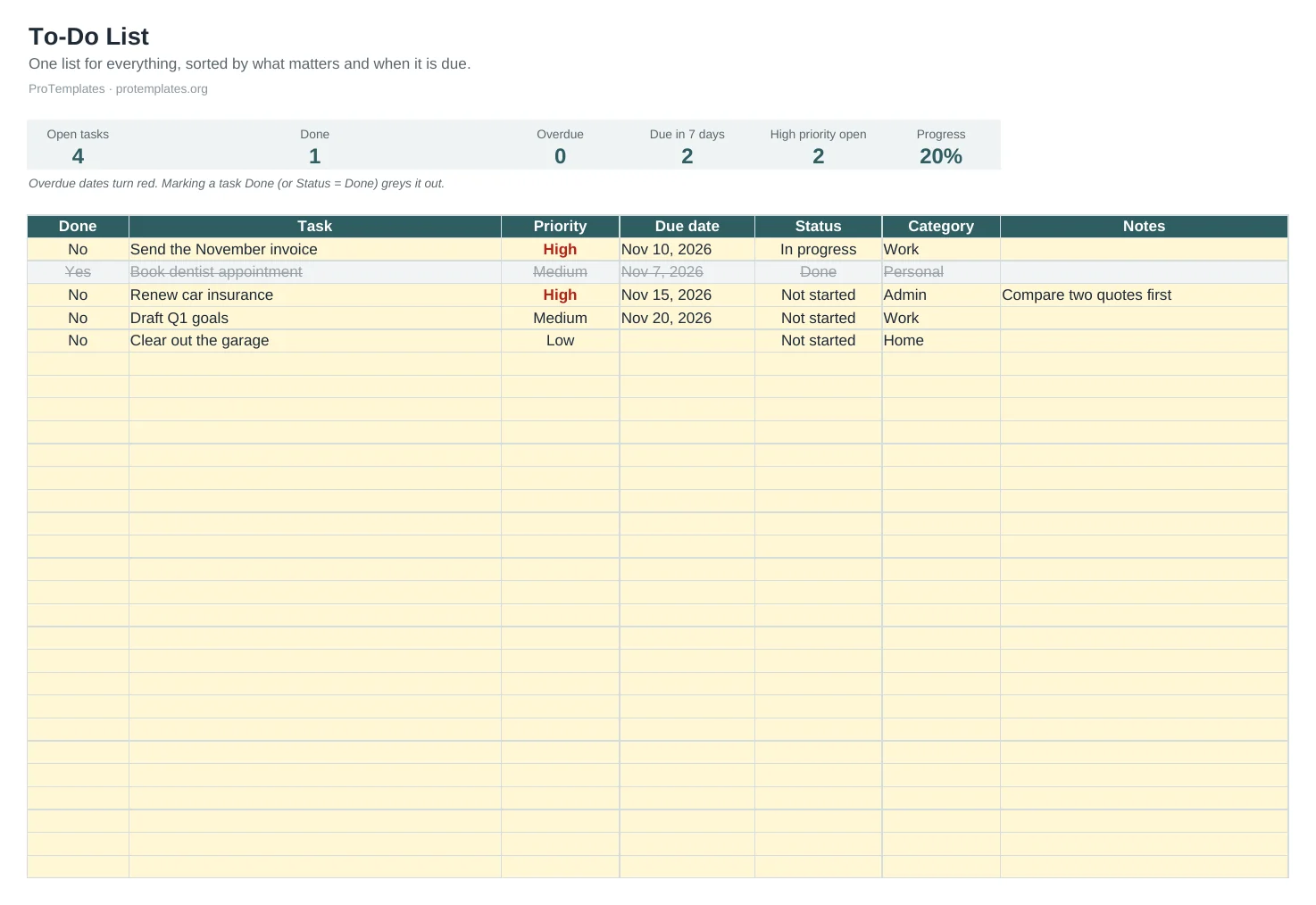
To-Do List Template
This free to-do list template keeps all your tasks in one sortable list with priority, due date, status and category. Overdue dates…
-
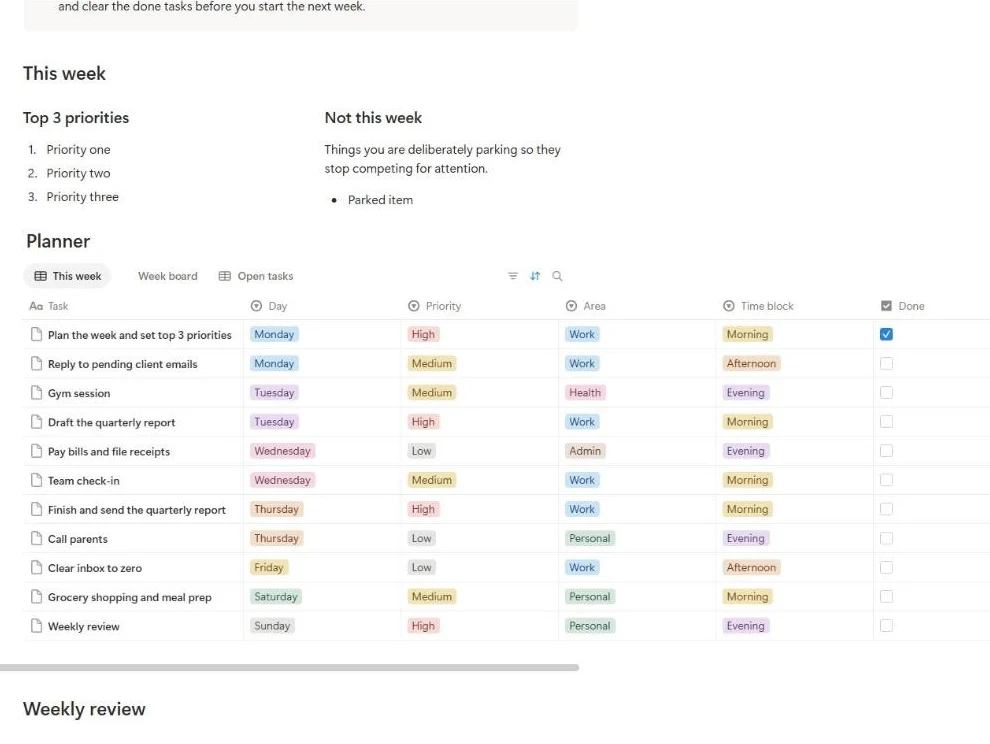
Weekly Planner Template for Notion
This free weekly planner template for Notion keeps the whole week on one page. You set three priorities, park what can wait,…
Why most productivity systems fail
Most productivity systems are abandoned within a few weeks, and usually for the same reason: they ask for more upkeep than the work they organise. Ten categories, five tags and three apps feel thorough on day one and exhausting by day ten. When updating the system becomes a task of its own, people quietly stop.
The fix is to keep each tool small and give it one job. A list holds tasks. A planner holds this week. Meeting notes hold decisions and actions. When each piece does one thing, it takes minutes to maintain and you always know where to look.
Capture everything in one list
The first step is getting tasks out of your head and into one trusted place. Unfinished tasks have a way of resurfacing at the wrong moment, a pattern psychologists link to the Zeigarnik effect. Research by E. J. Masicampo and Roy Baumeister, published in the Journal of Personality and Social Psychology in 2011, found that making a specific plan for an unfinished goal was enough to reduce those intrusive thoughts, even before the goal was done. Writing a task down with a next step and a date is a small version of that plan.
A good task list has only a few columns:
- Task: written as an action, starting with a verb. “Call the accountant about VAT” rather than “accountant”.
- Due date: only when there is a real deadline. Invented dates train you to ignore dates.
- Priority: high, medium or low, decided once, not every morning.
- Status: open, in progress or done.
- Category: work, home, a client or a project, so you can filter.
The to-do list template has exactly these, with dropdowns for done, priority and status, overdue dates in red, finished tasks greyed out and counters for what is open, done, overdue and due in the next seven days. It opens in Excel and Google Sheets, so it works offline and you can share it.
Keep the list short enough to read
A list with 150 open items stops being a list and becomes a source of guilt. Once a week, delete or park anything you know you will not do this month. Clearing finished tasks keeps the counters honest and the list readable on one screen.
Decide what matters: urgent versus important
Not every task deserves the same attention. In a 1954 address at Northwestern University, Dwight Eisenhower repeated a remark he credited to a former college president: that he had two kinds of problems, the urgent and the important, and that the two rarely coincided. The idea later became the Eisenhower matrix, which sorts tasks into four groups:
- Urgent and important: do these now. A client deadline today, a payment that bounces tomorrow.
- Important, not urgent: schedule these. Planning, learning, improving a process, the work that pays off later.
- Urgent, not important: delegate or minimise these. Many interruptions and requests that feel pressing but move nothing forward.
- Neither: drop these.
The second group is where most progress comes from and the one that gets pushed aside, precisely because nothing forces it. You do not need a separate matrix to use the idea. Mark important work as high priority in your list, and give it a fixed slot in your week before urgent requests fill the space.
Plan the week, not just the day
A daily list tells you what to do today. A weekly plan tells you whether today’s work is the right work. Looking at a whole week makes it easier to balance meetings with focused time, to spot an overloaded day early and to protect the tasks that matter.
Start each week by choosing three priorities, the outcomes that would make the week a success if nothing else got done. Three is enough to steer by and few enough to remember. Then write a “not this week” list for things you are consciously putting aside; naming them stops them nagging.
The weekly planner template for Notion puts the three priorities and the “not this week” list side by side at the top, with a planner database underneath where each task has a day, a priority, an area, a time block and a done box. It includes views by day, a board by day and a list of open tasks, and it works on Notion’s free plan.
Give priorities a time on the calendar
A priority without a time is a wish. Time blocking means giving important tasks a slot on the calendar, as you would a meeting. It does two things: it forces you to check that the work actually fits in the week, and it protects that time from being taken by whatever arrives first.
- Block your hardest work for the part of the day when you concentrate best, often the morning.
- Keep blocks between one and two hours. Longer blocks tend to be broken; shorter ones rarely allow deep work.
- Group small tasks such as email, admin and calls into one or two blocks rather than scattering them through the day.
- Leave some time unplanned. A calendar booked to the minute breaks with the first surprise.
The weekly planner’s time block field is there for this: give each priority task its block and check that no single day is overloaded.
Make meetings produce actions
Meetings take a large share of most working weeks, and much of their value is lost within an hour because nobody wrote down what was decided. Good meeting notes separate three things: what was discussed, what was decided and who will do what by when. The last two matter most. Notes record what was said; decisions record what changed.
The meeting notes template for Notion lays out each meeting as agenda, notes, decisions and action items, with a database of all meetings, a calendar view and a view of meetings that still need a follow-up. It comes with three sample meetings: a team sync, a one-to-one and a client kickoff. Our guide on how to take meeting notes covers what to capture and how to share it afterwards.
Move every action item into your task list the same day. An action that lives only in meeting notes is easy to forget.
Close the loop with a weekly review
A weekly review is the habit that keeps everything else working. Once a week, ideally at the same time, you look back at what happened and forward at what is next. It usually takes twenty to thirty minutes.
- Clear finished tasks and update anything that changed.
- Move action items from the week’s meeting notes into your list.
- Check what you achieved against the three priorities you set.
- Look at next week’s calendar for deadlines and busy days.
- Choose next week’s three priorities and block time for them.
The weekly planner includes a three-question review in toggles so you can do it in the same place you plan. For a fuller walkthrough, read our guide to the weekly review. If you want to track the routines that support your week, such as exercise or reading, the habit tracker for Notion fits alongside it.
Notion or spreadsheet?
The productivity templates here come in two formats, and the right one depends on how you already work.
- Choose Notion if you already work there and like linking pages and databases together. The planner and meeting notes duplicate straight into your workspace and use only features from the free plan.
- Choose a spreadsheet if you want something you can open anywhere, work on offline, print or send as a file. The to-do list is a standard .xlsx that opens in Excel, Google Sheets, LibreOffice and Numbers.
Mixing them is fine. Many people keep a running to-do list in a spreadsheet and plan the week in Notion. What matters is that each task lives in one place.
Common mistakes and simple fixes
- Several lists in several places. Tasks in a notebook, an app, your inbox and sticky notes mean you never see the whole picture. Pick one list and move everything into it.
- Planning without checking time. Ten priorities in a week with twenty hours of meetings will not happen. Compare the plan with the calendar before the week starts.
- Using email as a task list. An inbox mixes requests, information and noise. Turn each request into a task with a date and archive the email.
- Rewriting the system instead of using it. A new app or a new layout feels like progress but rarely is. Change the system only when a specific problem keeps repeating.
- Skipping the review when the week is busy. Busy weeks are when the review helps most. Even ten minutes to clear the list and choose next week’s priorities is enough.
If you notice the same task moving from week to week without being done, ask whether it is still worth doing. Either break it into a smaller first step, give it a fixed time block, or delete it. A task that keeps moving costs attention every time you read it.
Guides
- The Weekly Review: A 30-Minute Routine That Works
A weekly review is a fixed half hour to empty your head, bring your lists up to date and choose what matters next week. It comes from David Allen's Getting Things Done, and it works without any special app.
Questions
Notion or spreadsheet?
Choose Notion if you already work there and like linking pages together. Choose the spreadsheet if you want a file you can open anywhere, print or share as an attachment.
Do I need a paid Notion plan?
No. The Notion templates use pages, databases, formulas and standard views, all included in Notion’s free plan.
Why only three weekly priorities?
Three is enough to give the week a direction and few enough to remember without checking. If everything is a priority, nothing is.
How often should I update my to-do list?
Add tasks as they come up, check it each morning and clean it once a week during your review.
Can I share these with my team?
Yes. Share the Google Sheet or the Notion page as you would any other file. For team projects with owners and deadlines, the project tracker in our project management section is a better fit.