What’s inside
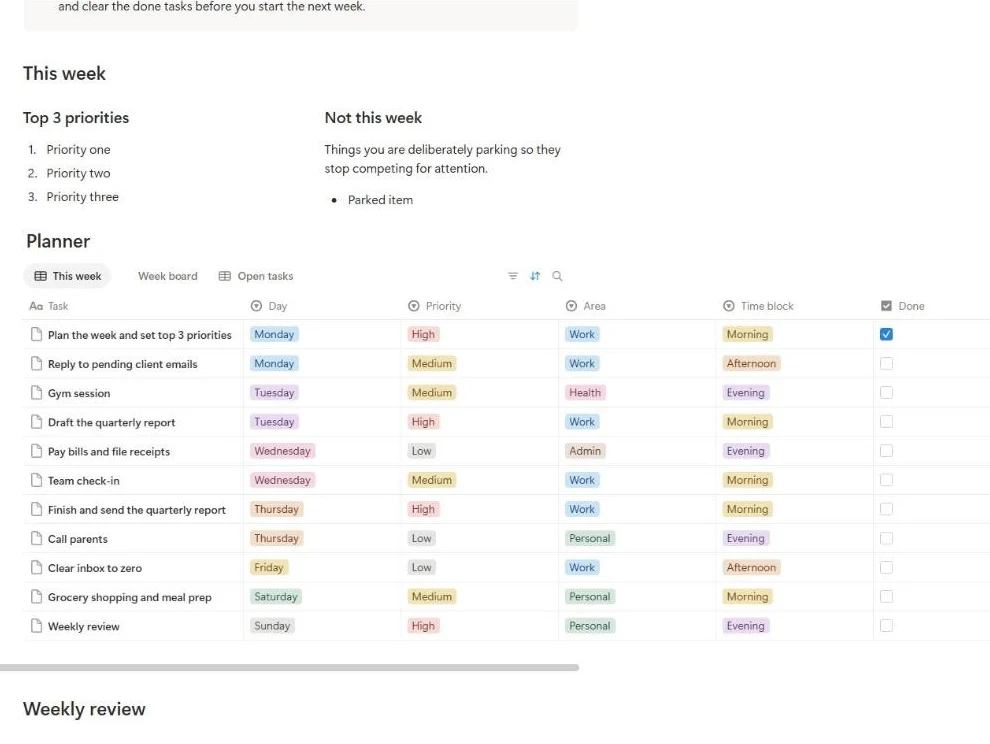
- Top 3 priorities and a Not this week list, side by side
- Planner database with day, priority, area, time block, done and notes
- Three views: the week sorted by day, a board by day and a list of open tasks
- A three-question weekly review in toggles
- Eleven example tasks you can overwrite or delete
How to use it
- Click the duplicate button to copy the template into your Notion workspace.
- Write your three priorities for the week and anything you are parking.
- Add each task with its day, priority and time block.
- Work from the Open tasks view and tick Done as you finish.
- On Sunday, answer the three review questions and clear finished tasks.
FAQ
Does it work on the free Notion plan?
Yes. It only uses pages, a database and standard views, all of which are included in Notion’s free plan.
Why only three priorities?
Three is enough to steer the week and few enough to remember without looking. Everything else goes into the planner as tasks, so nothing is lost.
Can I reuse it every week?
Yes. Keep the page and clear finished tasks after the review, or duplicate the page each week if you want to keep a record of past weeks.
Can I change the areas and time blocks?
Yes. Both are select properties: click the property name, edit the options and the board and views update on their own.