What’s inside
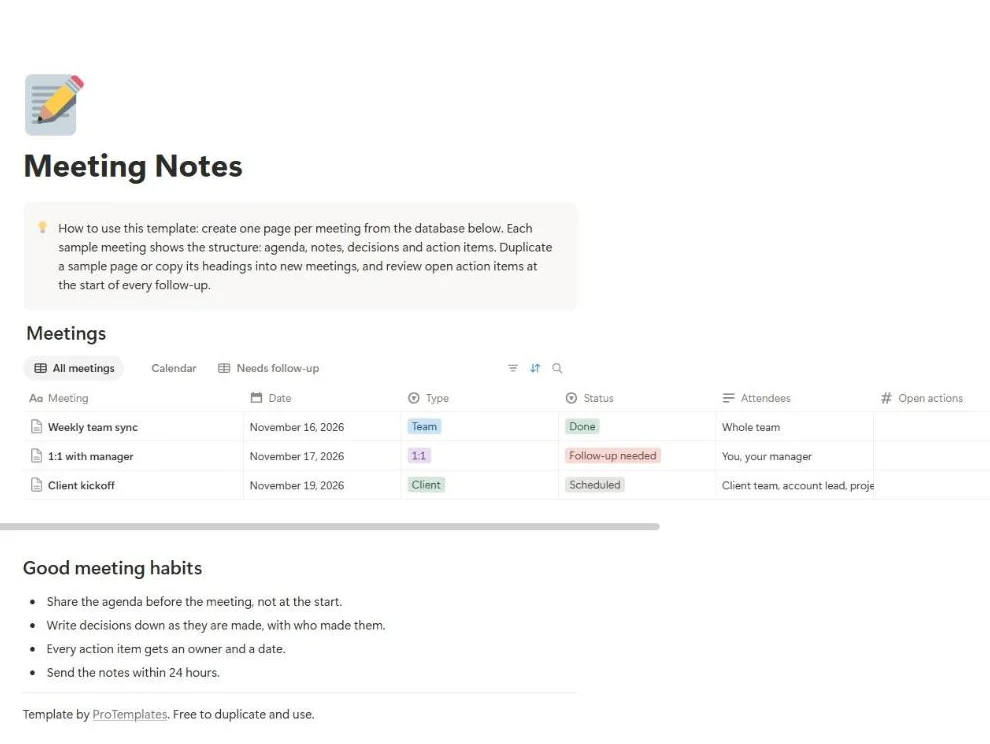
- Meetings database with date, type, status, attendees and open actions
- Three sample meetings: a team sync, a one-to-one and a client kickoff
- Each meeting page laid out as agenda, notes, decisions and action items
- Views for all meetings, a calendar and the ones that need a follow-up
- A short list of habits that make meeting notes useful
How to use it
- Click the duplicate button to copy the template into your Notion workspace.
- Open a sample meeting to see the structure, then add a new meeting page.
- Write the agenda before the meeting and share the page with attendees.
- During the meeting, record decisions with who made them.
- Give every action item an owner and a date, and update Open actions.
FAQ
Why keep decisions separate from notes?
Notes record what was said; decisions record what changed. Keeping them apart means anyone can read the decisions in ten seconds without going through the whole discussion.
How do new meetings get the same structure?
Duplicate a sample meeting page and clear its content, or save one as a database template in Notion so every new page starts with the four headings.
Can I use it for one-to-ones?
Yes. The 1:1 sample includes workload, goals, feedback and development, and the Type property lets you filter one-to-ones from team meetings.
Does it work on the free Notion plan?
Yes. It uses a single database with standard table and calendar views.