
Small businesses rarely lose customers because their marketing is not clever enough. They lose them because nobody planned what to say, posts went out when someone remembered, and a promising lead was never followed up after the first call. Marketing and sales work is mostly planning and follow-up, and both are easier with the right files.
This guide covers the four pieces that most small teams need: a marketing plan that sets goals and choices, a content calendar that turns them into dates, a social media calendar that keeps posts balanced, and a CRM that makes sure every lead gets a next step. Each section links to the free ProTemplates file that handles it.
All sales and marketing templates
-
Content Calendar Template
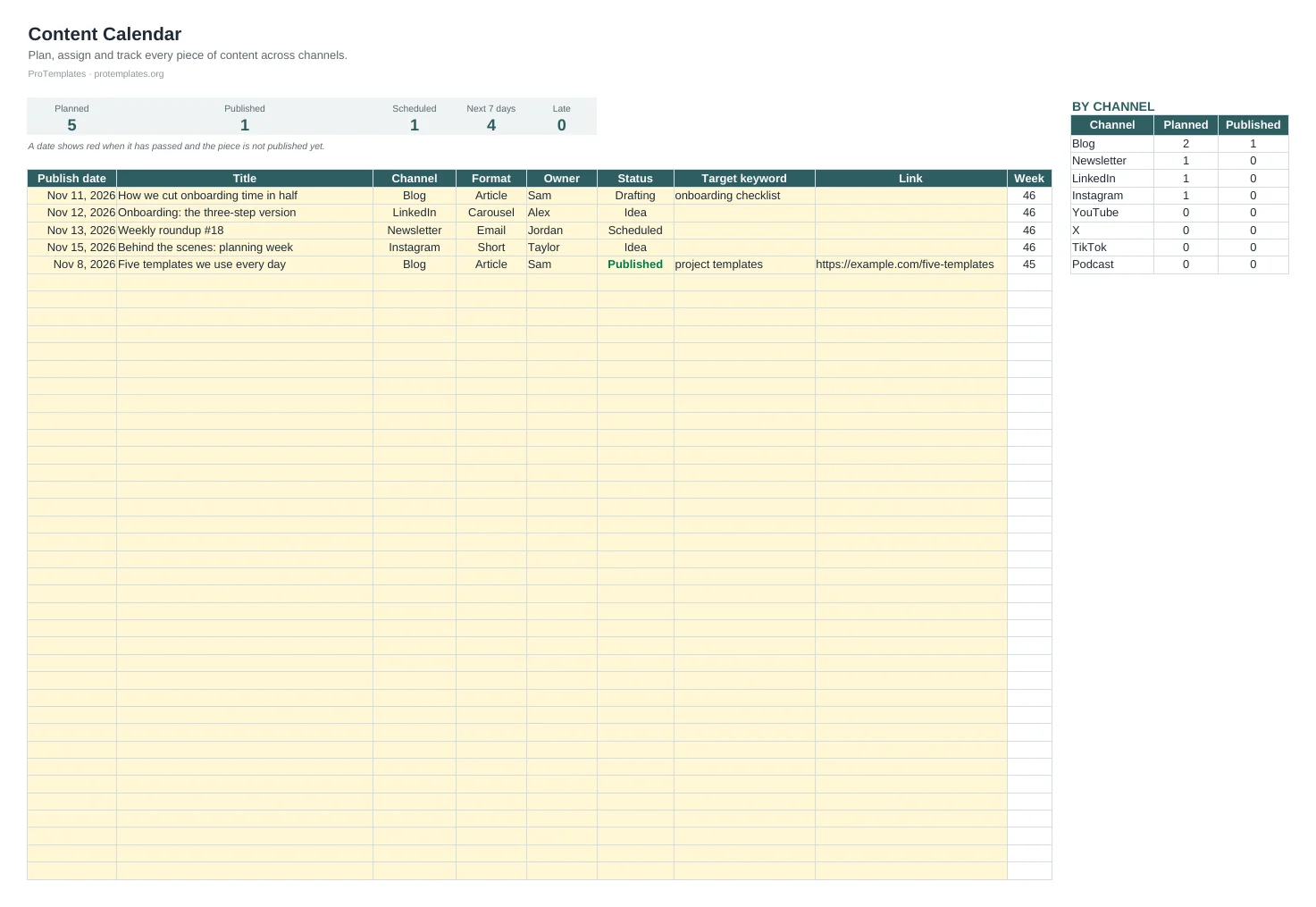
This content calendar template keeps every piece of content in one list with its publish date, channel, format, owner and status. It…
-

Marketing Plan Template
This marketing plan template walks you through goals, your current situation, the target audience, positioning, competitors, channels, budget, timeline and measurement. Each…
-
Simple CRM Template for Google Sheets
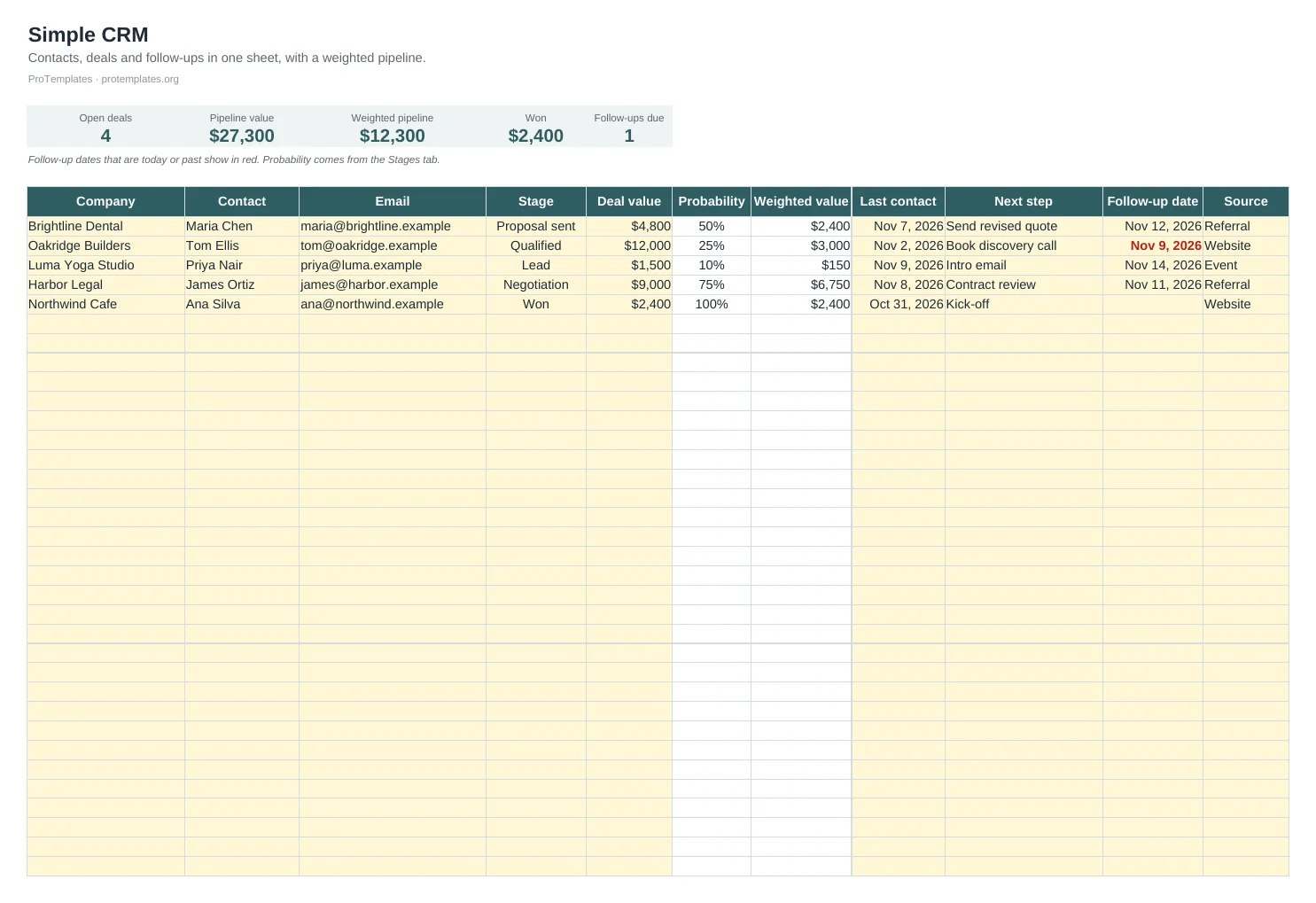
This simple CRM template for Google Sheets tracks contacts and deals with their stage, value, last contact, next step and follow-up date.…
-
Social Media Calendar Template for Notion
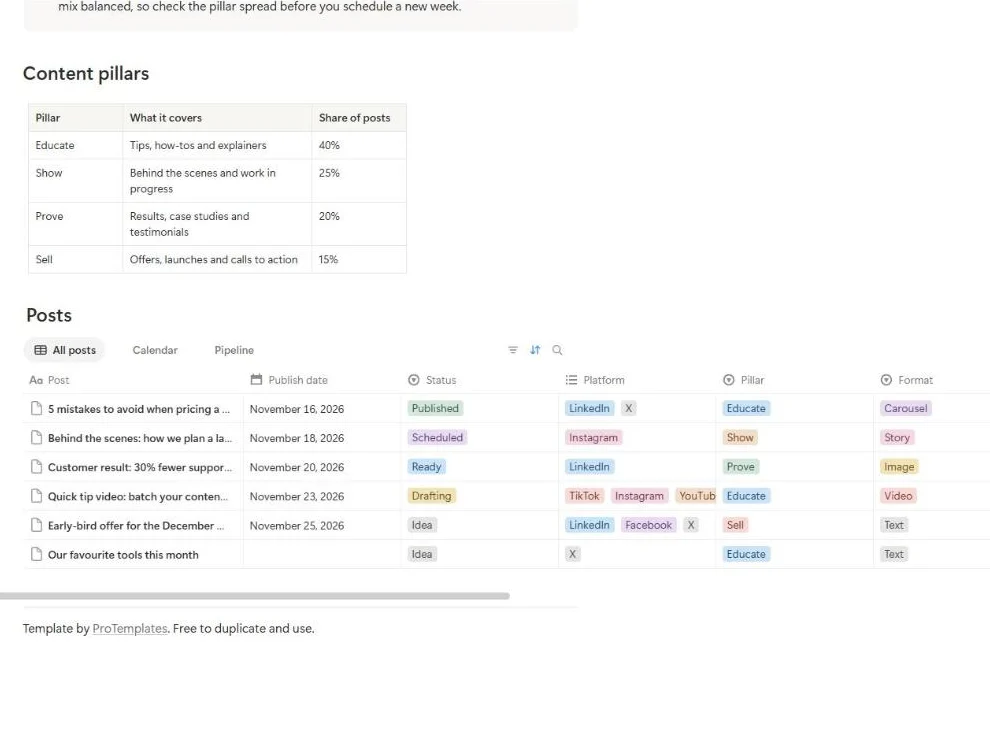
This free social media calendar template for Notion plans every post in one database, with its publish date, platforms, content pillar, format…
Marketing and sales as one system
Marketing creates interest; sales turns interest into revenue. In a small business the same people often do both, and the handover between them is where money leaks. A visitor downloads a guide, a prospect replies to a post, a contact asks for a quote, and then nothing happens because the next step lived in someone’s inbox.
Treat the four tools as one chain. The plan decides who you want to reach and what you want them to do. The calendars make sure you show up consistently. The CRM catches everyone who responds and keeps them moving. If one link is missing, the effort in the others is partly wasted.
Start with a marketing plan
The U.S. Small Business Administration describes the relationship simply: your business plan holds the central elements of your marketing strategy, and your marketing plan turns that strategy into action. Its suggested sections include the target market, competitive advantage, sales plan, marketing and sales goals, an action plan and a budget.
The marketing plan template follows a similar path in ten sections, from goals to measurement, with guidance under each heading and tables for goals, a SWOT analysis, channels, budget and timeline. For most small businesses the finished plan runs to four to eight pages. Write it in this order:
- Goals first. Each one with a metric, a target and a date, such as “200 new email subscribers by the end of the quarter”.
- Audience and positioning. Who you serve and why they should choose you over the alternatives.
- Channels and tactics. Only the ones that serve the goals.
- Budget and metrics. What you will spend and what you will review each month.
- Summary last. It is easier to summarise a plan that already exists.
Know who you are talking to
Every later decision depends on how well you understand the people you want to reach. Describe them in practical terms: what problem brings them to you, where they look for answers, what makes them hesitate and who else they are comparing you with. Talk to existing customers if you have them. Five short conversations usually teach more than a week of guessing.
From that, write a one-sentence positioning statement: for whom, what you offer, and the one reason it is different. The marketing plan template includes a structure for it. If you cannot write the sentence, your posts, emails and sales calls will struggle to say it either.
Choose a few channels and commit
It is tempting to be everywhere: a blog, a newsletter, five social networks, paid ads and events. With a small team the result is usually thin, irregular activity in many places and real results in none. Pick the two or three channels where your audience already spends time and where you can publish consistently, and do those well before adding more.
- Search and a blog suit businesses whose customers look for answers before they buy. Results build slowly but last.
- Email is the channel you own. A small list of interested readers often outsells a large social following.
- Social media suits visual products, personal brands and communities. Pick the network where your buyers are, not the one with the most users.
- Direct outreach and referrals often work best for service businesses selling to other businesses.
Review the choice each quarter against the numbers. Drop a channel that shows nothing after a fair trial and put the time into the ones that work.
Turn the plan into a content calendar
A plan without dates turns into good intentions. A content calendar lists every piece you will publish, on which channel, in what format, by whom and when. It shows gaps and pile-ups at a glance and makes it easy to plan around launches, seasons and events.
The content calendar template for Excel and Google Sheets holds up to 150 pieces with channel, format and status dropdowns, highlights late items in red, counts what is planned, scheduled, published and upcoming, and totals planned against published by channel. Many teams plan four to six weeks ahead and leave room for timely pieces.
- Add each piece with its publish date, channel, format and owner.
- Move the status along as the work progresses.
- Add the live link once it is published, so you can find it for reporting.
- Each week, review late items and the next seven days.
Plan social media with content pillars
Social media needs its own plan because of volume. Several posts a week across networks is hard to keep varied without a structure. Content pillars provide it: three to five themes you post about, each with a rough share of your posts, for example teaching, behind the scenes, customer stories and offers. Tracking the pillar of each post shows quickly when you are selling too much or teaching too little.
The social media calendar template for Notion has a posts database with publish date, status, platforms, pillar, format, caption and link, plus calendar, pipeline board and list views. It comes with four pillars and a suggested share for each, and six example posts across LinkedIn, Instagram, X, TikTok and YouTube. Platforms are a multi-select, so one post can be planned for several networks. It plans and tracks posts; publishing happens in each network or your scheduling tool.
Use the Google Sheets content calendar if you need one schedule across all channels, and the Notion calendar if social media is a large share of your work and you want pillars and a board.
Track every lead in a simple CRM
A CRM, short for customer relationship management, is a record of everyone you might sell to: who they are, where the conversation stands, what the deal could be worth and when you will next get in touch. Most lost sales are not lost to a competitor. They simply go quiet because nobody followed up.
The simple CRM template for Google Sheets has a pipeline for up to 100 deals, a stage dropdown linked to closing probabilities, a weighted value for each deal and in total, follow-up dates highlighted when due, and a stages tab that shows deals and value per stage. A weighted pipeline multiplies each deal’s value by its chance of closing, which gives a more realistic forecast than adding up every open deal.
Rules that keep a pipeline honest
- Every open deal has a next step and a date. No date means the deal is stalled.
- Start each day with the follow-ups that are due.
- Adjust stage probabilities to match what actually happens in your sales, not what you hope.
- Close lost deals as lost and note why. The reasons are some of the most useful data you will collect.
A sheet works well for a few hundred contacts and one or two people selling. Move to a dedicated CRM when several people sell at once or you need email tracking and automation, and import the sheet when you do.
A simple sales process
Small teams rarely need a complex sales methodology, but they do need the same few steps every time so that nothing depends on memory. A typical process for a service or B2B business looks like this:
- New lead: someone has shown interest. Reply within one working day, while the interest is fresh.
- Qualified: you have confirmed they have the problem you solve, a budget in the right range and a reason to act now.
- Proposal: you have sent a price and a scope in writing.
- Negotiation: you are answering questions and agreeing details.
- Won or lost: the deal is closed either way, with a note on why.
Keep the stage names in the CRM the same as the steps you actually follow, and edit them on the stages tab if your process differs. When most deals stall at one stage, that is where to improve: a clearer proposal, a faster reply or a better qualifying question often moves more revenue than new marketing.
Write short follow-ups that add something each time, such as an answer to a question they raised, a relevant example or a clear next step with a date. A message that only asks whether they have had a chance to look is easy to ignore.
Measure what matters
Choose a handful of numbers that connect activity to revenue and review them monthly. The exact list depends on your business, but most small teams can start with these:
- New leads per month, and where they came from.
- Conversion from lead to customer.
- Pipeline value, weighted, at the end of each month.
- Content published against planned, by channel.
- Marketing spend against the revenue it brought in.
The SBA recommends comparing marketing and sales costs with the revenue they generate to check you are getting a positive return. If you want these figures on one page, the KPI dashboard template in our analytics section can hold them.
Common mistakes and simple fixes
- Tactics before goals. Starting a podcast because competitors have one is not a plan. Decide what you want to achieve first.
- Too many channels. Three channels done consistently beat eight done occasionally.
- Only selling. If every post is an offer, people stop reading. Use pillars to keep a balance.
- No follow-up system. Leads that are not written down are leads that are lost.
- Never reviewing the plan. Review results monthly and revise the plan each quarter.
Questions
Is a spreadsheet CRM enough for a small business?
For a few hundred contacts and one or two people selling, yes. When you need email sync, automation or several sellers working at once, move to a dedicated CRM and import the sheet.
What is the difference between the two calendars?
The Google Sheets content calendar is a schedule across all channels. The Notion social media calendar is built for social posts, with content pillars, statuses and a board view.
How long should a marketing plan be?
Long enough to cover each section clearly. For a small business that is often four to eight pages.
How far ahead should I plan content?
Four to six weeks works for many teams, with room left for timely pieces. Plan further ahead around launches and seasonal peaks.
How often should I update the marketing plan?
Review results every month and revise the plan each quarter, or sooner if your audience or offer changes.