What’s inside
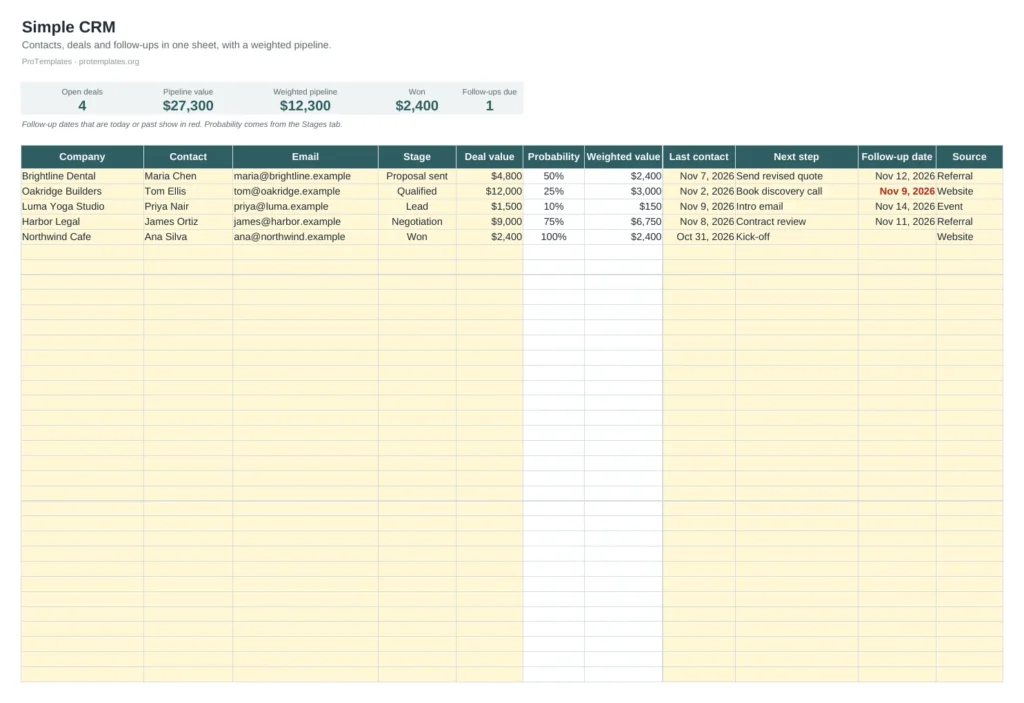
- Pipeline tab for up to 100 deals
- Stage dropdown linked to closing probabilities
- Weighted value per deal and in total
- Follow-up dates highlighted when due
- Stages tab with deals and value per stage
How to use it
- Add each company or deal with contact details, stage and value.
- Log the last contact, next step and follow-up date.
- Adjust stage probabilities on the Stages tab to match your sales history.
- Start each day with the follow-ups in red.
FAQ
What is a weighted pipeline?
Each deal’s value multiplied by its chance of closing. It gives a more realistic forecast than adding up every open deal.
When should I move to a dedicated CRM?
When several people sell at once, or you need email tracking and automation. Until then, a sheet is quick and free.
Can I change the stages?
Yes. Edit the names on the Stages tab and update the dropdown list on the Pipeline tab.