What’s inside
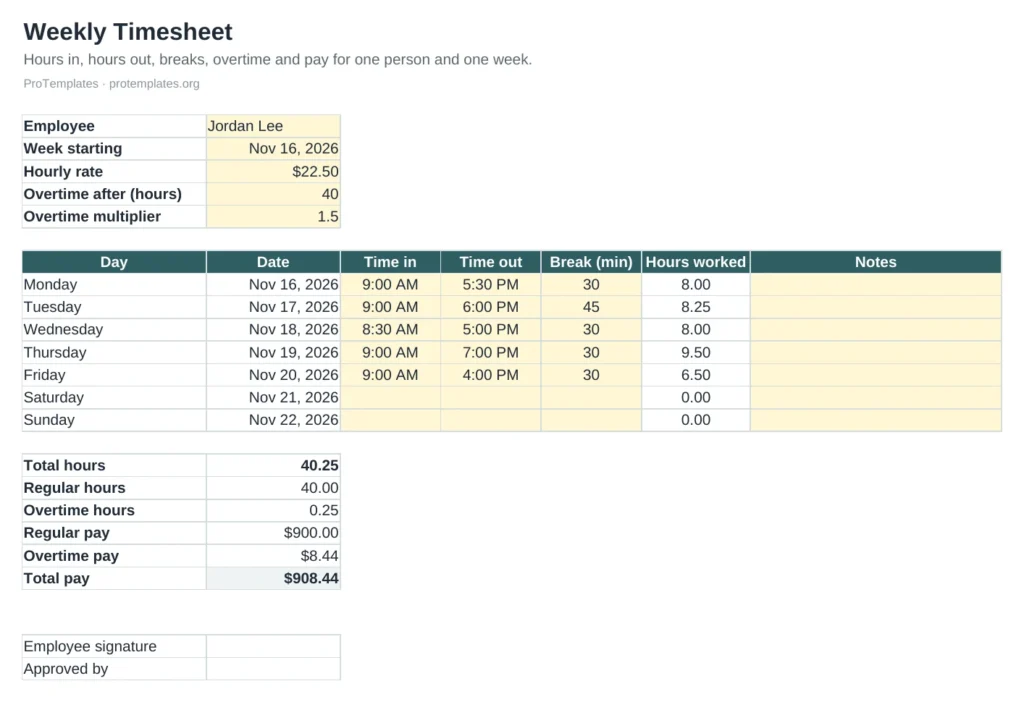
- Seven days with dates filled in from the week start
- Time in, time out and break minutes per day
- Total, regular and overtime hours
- Regular pay, overtime pay and total pay
- Signature and approval lines
How to use it
- Enter the employee, week start, hourly rate and overtime rules.
- Fill in times and breaks for each day worked.
- Check the totals and pay.
- Print or save as PDF for signature.
FAQ
Does it handle shifts past midnight?
Yes. A shift that ends after midnight is counted as running into the next day.
Is overtime calculated daily or weekly?
Weekly, above the number of hours you set. If your rules use daily overtime, adjust the formula or ask your payroll provider.
Can I use it for contractors?
Yes. Set the overtime threshold high enough that it never triggers.